Ikonky a odznaky
Get a logo, a live server status badge, or a voting widget for your website. Everything updates automatically; you only need to insert the code once.
Logo a ikona
Static SVG files — sharp at any size and can also be inserted as an image. They all use the same grass icon as the website header and favicon in the tab. The code below is therefore complete. including a link to us — without a link, an embedded logo does not count as a backlink.
Logo for a light background

File path:
https://minecraftlist.eu/ikony/logo-cerny.svg
HTML to insert (with a link to us):
<a href="https://minecraftlist.eu" target="_blank" rel="noopener"><img src="https://minecraftlist.eu/ikony/logo-cerny.svg" alt="MinecraftList.eu" height="56" loading="lazy"></a>
Logo for a dark background
File path:
https://minecraftlist.eu/ikony/logo-bily.svg
HTML to insert (with a link to us):
<a href="https://minecraftlist.eu" target="_blank" rel="noopener"><img src="https://minecraftlist.eu/ikony/logo-bily.svg" alt="MinecraftList.eu" height="56" loading="lazy"></a>
Icon (favicon, badge)

File path:
https://minecraftlist.eu/ikony/ikona.svg
HTML to insert (with a link to us):
<a href="https://minecraftlist.eu" target="_blank" rel="noopener"><img src="https://minecraftlist.eu/ikony/ikona.svg" alt="MinecraftList.eu" width="64" height="64" loading="lazy"></a>
Live server badge
The badge shows server icon, name, status and player count — and in the corner of the icon a crown, medal or star when the server holds a priority spot. It's an image, so it loads by itself in the browser and is always up to date (we keep it 5 minutes in cache).
Sample (Crafteria Survival) — large badge
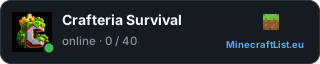
HTML to insert:
<a href="https://minecraftlist.eu/server/crafteria-survival?utm_source=odznak&utm_medium=server&utm_campaign=crafteria-survival" target="_blank" rel="noopener"><img src="https://minecraftlist.eu/odznak/crafteria-survival.svg" alt="Crafteria Survival on MinecraftList.eu" width="320" height="64" loading="lazy"></a>
Small badge for the footer
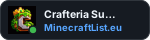
<a href="https://minecraftlist.eu/server/crafteria-survival?utm_source=odznak&utm_medium=server&utm_campaign=crafteria-survival" target="_blank" rel="noopener"><img src="https://minecraftlist.eu/odznak/crafteria-survival/maly.svg" alt="Crafteria Survival on MinecraftList.eu" width="150" height="40" loading="lazy"></a>
Markdown (e.g., for a README on GitHub):
[](https://minecraftlist.eu/server/crafteria-survival?utm_source=odznak&utm_medium=server&utm_campaign=crafteria-survival)
Voting widget
The widget is a small card with the server status and a button. Hlasovat pro server. It is inserted with one <script> a it renders exactly where you insert it — it will find its place on its own; you don’t need to set anything else up.
This is how it will look (Crafteria Survival)
The widget has its own dark border, so it looks the same on light and dark websites. The preview is therefore on a dark background:
Code to insert — copy the entire line:
<script src="https://minecraftlist.eu/widget/crafteria-survival.js" async></script>
Where to insert that code
-
Custom website (HTML or template): there, where the card should be on the page — most often in the footer before
</body>, even in the middle of the voting page. - WordPress: Vzhled → Widgety → blok Custom HTML, or directly into the footer template. For the article, a block is enough Custom HTML.
- Other templates and builders (Enjin, XenForo, Wix, Webnode…): look for a field for "custom code" or "HTML" in the website footer and paste it there.
- Forum or email signature: the script doesn't work there (forums and mail block scripts) — use instead odznak, it's an ordinary image and it gets inserted everywhere.
The code is for the server Crafteria Survival — for another server, select it in the switcher at the top of the page and the code will be rewritten.
Partner server
You can take it onto your website odznak (on the left is your server's icon, on the right is our logo) or voting widget. We check what is actually on the website — we distinguish three levels:
- badge on your website — on the page there is the address of our badge (or widget) for your server: verified backlink. The badge is different for each server, so it can be recognized even on its own without a link.
- actual link to MinecraftList.eu — there is a link on the page
<a href="…minelist.cz…">: Valid. Ours belongs here too logo or icon — they are the same for everyone, so they only count when they are linked (the ready-made code for them is higher up on this page). - just a mention of the name — minelist.cz appears somewhere on the page, but it is not a link (for example, an email in the footer or an image without a link): That is not enough for labeling..
The first two levels mean a designation. partner server on the profile and in the list. We check automatically every 6 hours, so you just need to insert the badge and the label will appear on its own. When you fix it, you don’t have to wait — You’ll run the check yourself. on your server's profile (at most once an hour). It can also be overridden manually in the administration.
We only search at the address from the field. Web for the server. If you don’t have your website filled in, you won’t get the badge. A mere mention of the name is no longer enough for the badge — we need a link that can be clicked.